Open-source beta / self-hosted first / April 2026
Self-hosted AI workers
with review before
anything consequential.
For small teams that want AI to work from their own docs, suggest useful next steps, and keep the resulting work visible in the workspace.
There's a shared demo for a quick look. If you want to judge it seriously, run it locally or deploy the single-node stack yourself.
Core loop
How it works.
- 01
Start from your own docs
Point the worker at your docs, runbooks, or internal knowledge instead of generic model training data.
- 02
Draft something concrete
Turn that context into a reply, ticket, or proposal that your team can read and judge — not just a chat response.
- 03
Pause before anything that matters
When the next step has real consequences, Clawback stops and shows you the work before it acts.
- 04
Keep a record
What happened stays visible in Inbox, Work, and Activity — so you have state you can go back to, not just a conversation log.
Start paths
Three ways to start.
Hosted demo
No clone needed. Quickest way to look around.
Walk through the Incident Copilot lane and see the review-before-action loop in a shared workspace.
The guide includes the public login and the first prompts to try. This is a shared sandbox, not your own workspace.
Local clone
Best way to see the full product.
Run the stack, seed a workspace, and poke around setup, inbox, work, and activity yourself.
You'll need a local checkout and a provider API key. Best for contributors and anyone evaluating it seriously.
Single-node deploy
Your own workspace on a real server.
Use the supported single-node deploy path (Compose-based) from the docs to run your own workspace on a server.
You can deploy from a local checkout. The remote host does not need its own Git clone.
Working now
- Answers grounded in your own docs and knowledge
- Actions stop for review before they execute
- Work and activity stay visible after the run
- Single-node self-hosted deployment works today
Not yet
- The shared demo covers one assistant lane
- Provider support is still limited
- This is not a no-code workflow builder
- The product is focused on a few strong paths, not every use case
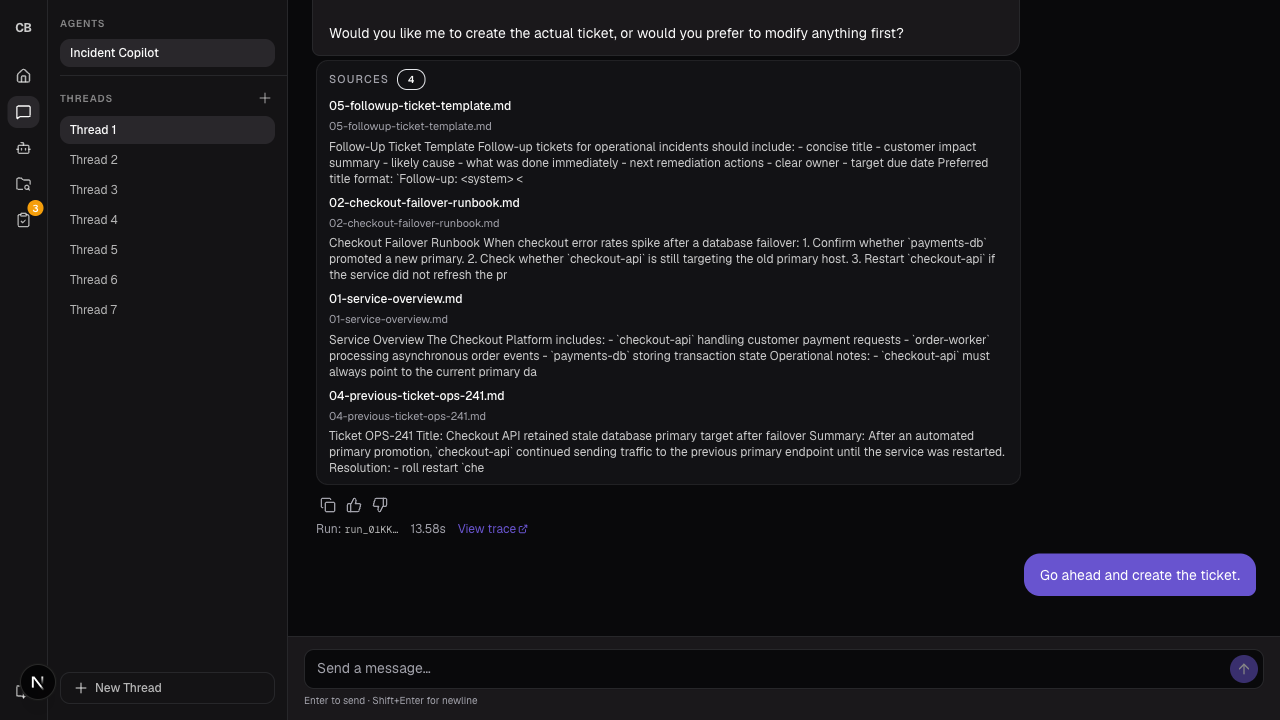
Shared demo
Try the demo.
The hosted demo is the fastest way to see the Incident Copilot lane and the approval handoff. The guide includes the public evaluator login and the first prompts to try. It's not a replacement for running your own workspace — just a quick way to get a feel for the flow.